AI Topology Optimization Complete Guide: SIMP Method, Generative Design, Free Tools, and 3D Printing in Practice — 2026 Edition
swiftwand swiftwand.ai

A 3D print that fails at hour two of a twelve-hour job wastes filament, time, and often the bed adhesion you spent care setting up. AI failure detection is the technology that watches for exactly that and steps in early. In 2026 it comes in two forms: built into the printer, as on Bambu and Creality machines, or bolted on with a general tool such as Obico or OctoEverywhere. This article compares both so you can decide which kind of watchdog fits your printing.
This article contains affiliate links. As an Amazon Associate, we earn from qualifying purchases.
At its core, AI detection trains a model to recognize the visual signatures of a failing print. The most common target is the “spaghetti” failure, where the part detaches and the nozzle extrudes loose strands into the air, but good systems also flag first-layer problems and flow inconsistencies. A camera streams frames, the model scores each one, and when the probability of failure crosses a threshold the system can alert you or pause the print. The value is not magic perfection; it is catching a doomed job early enough to save the spool and the hours behind it.
Bambu Lab runs its failure detection on the device itself, keeping the camera footage local rather than sending it to the cloud. The strength here is twofold: privacy, because the video never leaves your network, and responsiveness, because detection does not depend on an upload round trip. The trade-off is vendor lock-in — the feature lives inside Bambu’s ecosystem and works with Bambu’s machines and app, not as a portable tool you can move to another printer.
Creality’s K2 Plus takes a different built-in route, splitting the job across two AI cameras backed by 18 sensors. One camera sits close to the nozzle for flow-rate and pressure-advance calibration, while the other is mounted on the front frame for video monitoring and failure detection. The reasoning is that calibration wants a tight close-up and monitoring wants a wide view, and a single lens would compromise both. By giving each task its own eye, the K2 Plus avoids the usual one-camera trade-off, at the cost of more hardware to build into the machine.
Now to the add-on tools. Obico is an open, cross-machine option that you can attach to OctoPrint or Klipper setups. Its free plan includes one printer, 10 AI Detection Hours per month, remote access, webcam streaming and a mobile app — free, indefinitely. The 10-hour monthly limit is the headline constraint: detection only runs against that budget, so heavy users hit the ceiling. Obico has also rolled out a next-generation AI model that, by its own figures, catches 63% fewer missed failures and produces 56% fewer false alarms than the previous model. As of May 2026 that next-gen model is offered to AI Premium subscribers (the plan formerly called Pro).
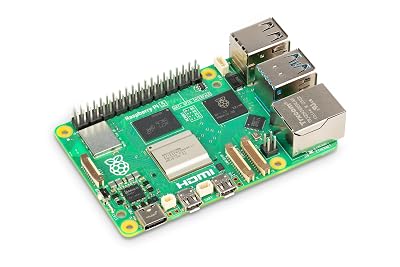
A USB webcam and a small computer are all an add-on setup needs.
OctoEverywhere offers Gadget, its AI failure-detection assistant, free and unlimited for all users. Where Obico’s free plan caps detection at 10 hours a month, Gadget runs detection with no time limit at no cost. The free tier also includes unlimited remote access, 20-second webcam streams, and support for three printers. For someone who wants always-on monitoring without watching a monthly hour budget, the unlimited free detection is the standout difference.
The choice tracks how you value convenience against freedom. Built-in detection, as on Bambu and the K2 Plus, is effortless — it works out of the box, processes locally or natively, and needs no extra hardware — but it ties you to one maker’s ecosystem. Add-on tools demand setup and a spare camera, yet they are portable across machines and let you pick the model and pricing that suit you: Obico if you want a polished app and only light detection hours, OctoEverywhere if unlimited free monitoring matters most. If you run a single-brand setup and want zero fuss, built-in wins; if you run mixed machines or want to control cost and data, an add-on is the freer path.
AI failure detection in 2026 is no longer a luxury; it is the feature that makes unattended printing realistic. Built-in options from Bambu and Creality trade portability for effortless, local operation, while Obico and OctoEverywhere trade setup effort for cross-machine freedom and, in Gadget’s case, unlimited free detection. Match the watchdog to your fleet and your tolerance for setup, and long overnight jobs stop being a gamble.
Obico: next-gen AI failure detection general release and pricing guide; OctoEverywhere: Gadget free and unlimited AI failure detection; Creality K2 Plus product information.